πŸͺΆ πŸƒ 🐦
πŸ”¬ Computational Biology Β· Citizen Science

Turn bird calls into real student understanding of the environment.

WREN builds and donates AI-powered listening stations β€” a Raspberry Pi running open-source BirdNet-Go β€” to schools and marine institutes, so students can discover the birds in their own backyard and contribute to global science.

6,000+bird species the AI can hear
~5Wpower Β· runs 24/7
100%open source & free to schools
● LIVE DETECTION
πŸŽ™οΈMic outside
β†’
Raspberry Pi
β†’
πŸ€–BirdNet AI
🐦 Anna's Hummingbird detected94%
Powered by BirdNet (Cornell Lab of Ornithology) β€’ Built on BirdNet-Go open source β€’ Data shared with BirdWeather
🌿 Our Mission

Hands-on science, powered by the birds outside the window

WREN distributes BirdNet-Go systems to classrooms, giving students the tools to understand their local ecosystems by monitoring the sounds of their local birds

🧬

Computational biology

Students see real machine learning at work β€” turning raw audio into spectrograms and species predictions with a neural network.

πŸ“š

Place-based learning

Lessons connect to the birds in your schoolyard, making biology and environmental science tangible and local.

🌎

Global impact

Every detection is shared with BirdWeather, contributing to worldwide citizen-science datasets used by real researchers.

βš™οΈ How it works

From a chirp outside to data scientists worldwide

The whole pipeline runs on a tiny computer the size of a deck of cards β€” no field researchers needed.

πŸŽ™οΈ

1 Β· Listen

A weatherproof microphone records 48kHz audio outdoors, 24/7.

2 Β· Process

The Raspberry Pi splits audio into 3-second chunks and filters noise.

πŸ€–

3 Β· Identify

BirdNet's neural net reads the spectrogram and names the species.

πŸ“Š

4 Β· Display

Detections appear live on a local web dashboard with confidence scores.

🌍

5 Β· Share

Verified detections are sent to BirdWeather for global research.

πŸ”¬ The computational biology

How a computer learns to hear a bird

Bioacoustics sits at the intersection of biology, physics, and computer science β€” and it's the perfect way to make AI concrete for students.

πŸ”Š Sound becomes an image

A Fast Fourier Transform converts each audio clip into a spectrogram β€” a 2D picture of frequency over time. Every species has its own visual "fingerprint."

🧠 A neural network reads it

A convolutional neural network (CNN) β€” the same kind of model used for image recognition β€” classifies that spectrogram and outputs a probability for each species.

πŸ“ˆ Confidence & analysis

Each detection comes with a confidence score, stored in a local SQLite database. Students can export the data and analyze it in Python with pandas and matplotlib.

β–Έ Live spectrogram
audio β†’ FFT β†’ spectrogram β†’ CNN β†’ species
The hardware

A research lab that fits in your hand

Low cost, low power, and fully programmable β€” the BirdPi is built to run quietly in a classroom for years.

BirdPi station
  • PlatformPlatform Raspberry Pi in an indoor enclosure
  • MicrophoneWeatherproof outdoor housing, 48kHz audio
  • SoftwareBirdNet-Go β€” open source, written in Go
  • Power~5W Β· runs continuously, plugs in indoors
  • OutputLocal web dashboard + BirdWeather cloud API
πŸ“‘ Why it matters

Birds are important indicators of ecosystem health

Acoustic monitoring is passive, scalable, and runs around the clock. Every station adds to a picture researchers can't build alone.

0bird species identifiable by the AI
0BirdWeather stations worldwide
0estimated decline in N. American birds since 1970
24/7continuous, non-invasive monitoring

North America has lost ~3 billion birds since 1970 (Cornell Lab, 2019). Monitoring at scale has never mattered more.

πŸ“š Classroom-ready lessons

Every BirdPi comes with a lesson plan

Standards-friendly presentations that walk students through the science, the system, and a hands-on activity. Download and preview them below.

🦜 Grades 6–8

Middle School: Listen Up!

  • 🐦 Why birds matter as environmental sensors
  • βš™οΈ How the detector works, step by step
  • πŸ” Bay Area birds you might find
  • πŸŽ‰ A predict-map-track class activity
⬇ Download (.pptx)
🧬 Grades 9–12

High School: Computational Bioacoustics

  • πŸ€– Machine learning, CNNs & spectrograms
  • Embedded systems & software architecture
  • πŸ“Š Data collection & analysis in Python
  • 🌐 Citizen science & open data
⬇ Download (.pptx)
πŸ› οΈ Setup

Curious how setup works?

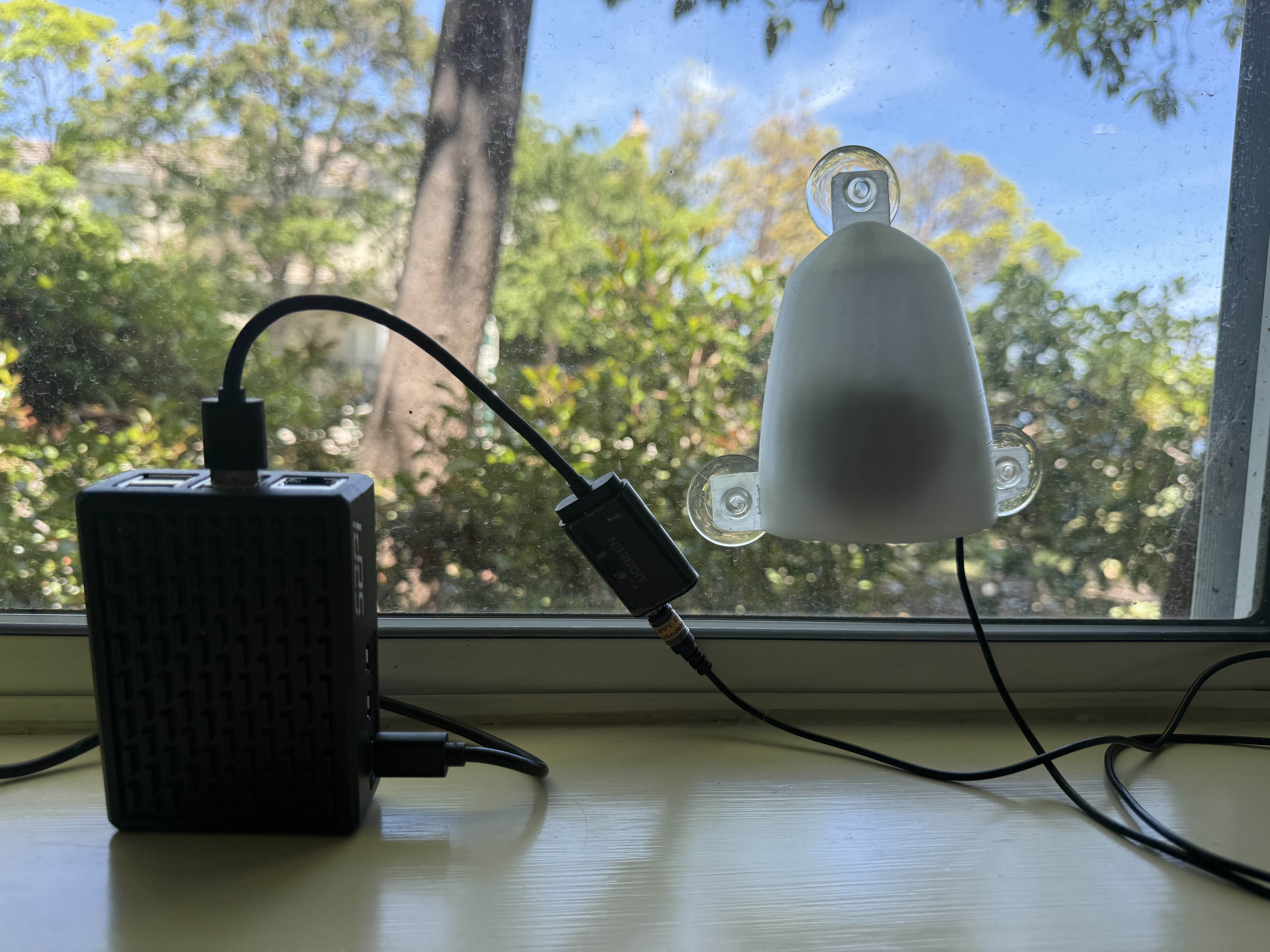
No hidden magic. Every station is built and configured before it ships, so setup at your school takes about 20 minutes and needs no technical background β€” here is the whole thing, from unboxing to first detection.

1Place the microphone outdoors+

The weatherproof microphone goes outside, where it has clear exposure to the surrounding environment.

  • A window ledge, a rooftop edge, or an exterior wall bracket all work well.
  • Keep it away from AC units, fans, and other constant noise sources β€” steady machine hum drowns out quiet calls.
  • The more open air it can “hear,” the more species you will pick up.
2Keep the Raspberry Pi inside+

Run the microphone cable through a window or door gap so the Pi can sit safely indoors β€” on a shelf, on a desk, or mounted to a wall.

  • It does not need a ventilated enclosure, but keep it out of direct sunlight.
⚠️ Do not leave the Pi outdoors. The microphone is weatherproof; the Pi is not.
3Power it up+
  • Plug in the included USB-C power supply. Other chargers often cannot supply enough power, which causes random reboots.
  • A green LED on the board means it is running. The first boot takes about a minute.
  • It draws roughly 5W β€” about a night light β€” so leave it running 24/7.
4Get the station online+

The station needs internet access to report detections to BirdWeather and receive updates. There are three ways to connect it, in order of preference. Try Tier 1 first β€” it takes under a minute and needs no configuration.

Tier 1 β€” Ethernet (recommended)

Plug a standard Ethernet cable into the port on the side of the Pi and into any active network jack or router port. The station detects the connection automatically and comes online within about 30 seconds. No passwords, no configuration.

βœ“ Stop here once the station is online. You do not need Tier 2 or Tier 3.
Tier 2 β€” Wi-Fi through the setup portal

Use this if there is no Ethernet port nearby. The station broadcasts its own temporary hotspot so you can hand it your school’s Wi-Fi details from a phone.

  • Power on the Pi and wait about 60 seconds for it to boot.
  • On a phone or laptop, open Wi-Fi settings and join the network named comitup-XXXX or birdpi-XX β€” the name is on your unit’s label.
  • A setup page should open automatically. If it does not, browse to 10.41.0.1.
  • Select your school Wi-Fi network, enter the password, and click Connect.
  • The hotspot disappears as the Pi joins your network. Wait about 30 seconds, then reconnect your own device to the school Wi-Fi.
⚠️ Some school networks need a browser-based login (captive portal) or block new devices by default. If the portal connects but the station still cannot reach the internet, go to Tier 3.
Tier 3 β€” Work with your school IT department

Enterprise school networks often need one more step before a new device gets online:

  • MAC address registration: many schools whitelist devices by hardware address. The MAC address is printed on your unit’s label β€” pass it to IT.
  • Network port / VLAN: IT may need to enable internet access on the specific port or room the station lives in.
  • Captive portal or certificate: some networks need a one-time browser login or a device certificate.
πŸ“ž WREN is happy to join a call with your IT department and explain exactly what the station needs. Email ario@wreninitiative.org.
5Watch the detections roll in+

From any device on the same network, open a browser and go to:

birdpi-YOUR_NUMBER.local
  • The dashboard shows recent detections with species name, confidence score, time, and a spectrogram of the actual recorded call.
  • You can filter by species, date, and confidence threshold β€” which is exactly where the classroom lessons pick up.
πŸ’‘ If the .local address does not resolve, use the station’s IP address instead. Your router’s connected-devices list will show it.
6Set up BirdWeather  β€” before your Pi ships+

BirdWeather is a free citizen-science platform that aggregates detections from stations worldwide for ornithological research. Configuring it puts your school on the global live map, and lets WREN check that each station is healthy and measure the program’s real-world impact.

  • Create an account: go to birdweather.com, click Live Map, then the person icon in the top-right corner. Confirm your email, then log back in.
  • Register your station: under your account menu open My Stations β†’ Add Station, enter your school name and location, and save. Copy the token it generates.
  • Send us the token: email the station token and your preferred station name to ario@wreninitiative.org.
βœ“ We pre-configure BirdWeather on your unit before shipping, so it starts reporting the moment it comes online.
🎁 Request a unit

Bring a BirdPi to your classroom

Are you a teacher, administrator, or educator at a school? Tell us about your class and we'll work to send you a free BirdNet-Go station and lesson plan.

πŸ”’ We only use your info to coordinate your BirdPi. No spam, ever.

βœ‰οΈ Get in touch

Questions? Write to us.

A real person reads every message β€” usually the student who built your station.

βœ‰οΈ ario@wreninitiative.org

We aim to reply within a couple of days.

🎁

Requesting a station

The request form is the fastest route β€” but email works just as well if you would rather write.

πŸ“Ά

IT & networking

Stuck getting a station online? We will happily join a call with your IT department and explain what it needs.

🌐

BirdWeather tokens

Send your station token and preferred station name and we will pre-configure the unit before it ships.